I was on a business trip to Dubai and wandering through the shelves of some computer shop when I saw a bunch of new tablets equipped with Windows 8. They were advertised as the perfect business and leisure companion. After reading online reviews for few weeks I decided to buy the Dell Venue 8 Pro and would like to give my personal review.
Look and size
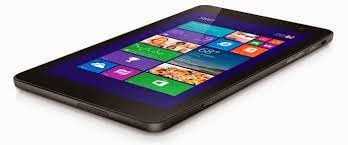
The Dell Venue 8 Pro is an 8 inch tablet with fairly average size and weight. with 9 mm of thickness and about 400 g of weight is slightly thicker and heavier than an iPad Air (7.5 mm and 330 g) or Samsung Galaxy Note 8 (7.95 mm and 340 g). I really doubt you would notice the difference unless you hold it for a very long time.
 The Venue 8 Pro comes in black color but if you buy it from Dell website you can also find a red version for the same price.
Software
The real value of this tablet it that it gives you the full power of Windows 8.1 and Office (not the RT version). Windows OS has two levels:
If you really miss your Android apps you can install Bluestacks. BlueStacks’ version of Android runs from within Windows, allowing it access to PC hardware including cameras, accelerometers or gyroscopes, and to the Windows file system.
Connectivity
The Venue 8 Pro has Dual-band WiFi and Bluetooth 4.0 connectivity; the version with 3G SIM slot will cost additional 100$ (or 100€). I use my Android smartphone for wifi or USB tethering when I'm traveling and it's pretty fast.
The Folio case protects quite well the tablet (it is made of impact resistant polycarbonate) without limiting access to ports and keys. It folds into a stand for two easy-viewing angles. Additionally, the case connects to the keyboard with magnets, so you can keep it attached when you are on the go then detach the keyboard and work at a distance and angle that's most comfortable for you.
 The Dell keyboard pairs easily with the tablet; it allows to write emails and work with Office and includes Windows shortcut keys, media control keys and function keys. With this bundle you really have a tablet/PC portable, light, professional and powerful.
I also got the Dell active Stylus to take notes with OneNote, select commands in desktop mode, replace the mouse/trackpad functionalities when you are traveling and don't have a surface. Dell had some issues with this stylus in the past but the Rev2 upgrade recently produced has solved many problems and it works fine.
A must have accessory is the OTG cable that allows to connect almost any USB device to this tablet. At home I use a standard wired mouse, external disk, 3G dongles, printer, etc.
The micro USB port is used both for charging and for connecting external devices but not at the same time. To enable battery charging and USB functionalities you need an adapter called +Port that is sold on Amazon (for 35$); this adapter has been funded through crowd funding and will start shipping in June.
For those who want a wireless mouse I suggest to get the Logitech T630: ultra light, portable, no need for batteries (USB charged), stylish, made for Windows 8 with its touch-sensitive surface.
Unfortunately the Venue 8 Pro does not feature an HDMI port. If you want a wired connection to an external monitor or TV the best option are:
If you prefer a wireless connection to an external TV, be aware that Windows 8 supports Miracast technology (which creates a direct wireless connection between TV and tablet). There are few options:
Look and size
The Dell Venue 8 Pro is an 8 inch tablet with fairly average size and weight. with 9 mm of thickness and about 400 g of weight is slightly thicker and heavier than an iPad Air (7.5 mm and 330 g) or Samsung Galaxy Note 8 (7.95 mm and 340 g). I really doubt you would notice the difference unless you hold it for a very long time.
Software
The real value of this tablet it that it gives you the full power of Windows 8.1 and Office (not the RT version). Windows OS has two levels:
- the Metro UI level is the new interface for mobile users that I find fast, colorful and easy to use. I like the live tiles although most Android widgets are more useful. With a swipe up you access the list of all apps, some will open straight away while some will open in desktop version much like a normal PC
- the PC level is a typical desktop that allows to use Office and other applications made for standard computer
The Venue 8 Pro includes Office Home and Student 2013 edition making a great deal for less than 300$. I got the Professional edition of Office and it works very well with this tablet.
Connectivity
The Venue 8 Pro has Dual-band WiFi and Bluetooth 4.0 connectivity; the version with 3G SIM slot will cost additional 100$ (or 100€). I use my Android smartphone for wifi or USB tethering when I'm traveling and it's pretty fast.
Screen
The Venue 8 Pro has an IPS Display with HD (WXGA 1280 x 800) resolution that has similar specs to the Galaxy Note 8 but very far from the quality of the retina display (2048-by-1536 resolution at 326 pixels per inch). OF course also the price of these products is not the same!
Accessories
I decided to buy the Dell original Folio case with bluetooth keyboard because it looks very professional and the keyboard has Italian layout. It's a bit expensive so if you use the english layout there are many other cheap cases and keyboards on Amazon or eBay. In this tread there is a list of accessories: http://forum.tabletpcreview.com/dell/59429-venue-pro-8-accessories.htmlThe Folio case protects quite well the tablet (it is made of impact resistant polycarbonate) without limiting access to ports and keys. It folds into a stand for two easy-viewing angles. Additionally, the case connects to the keyboard with magnets, so you can keep it attached when you are on the go then detach the keyboard and work at a distance and angle that's most comfortable for you.
The Dell keyboard pairs easily with the tablet; it allows to write emails and work with Office and includes Windows shortcut keys, media control keys and function keys. With this bundle you really have a tablet/PC portable, light, professional and powerful.I also got the Dell active Stylus to take notes with OneNote, select commands in desktop mode, replace the mouse/trackpad functionalities when you are traveling and don't have a surface. Dell had some issues with this stylus in the past but the Rev2 upgrade recently produced has solved many problems and it works fine.
A must have accessory is the OTG cable that allows to connect almost any USB device to this tablet. At home I use a standard wired mouse, external disk, 3G dongles, printer, etc.
The micro USB port is used both for charging and for connecting external devices but not at the same time. To enable battery charging and USB functionalities you need an adapter called +Port that is sold on Amazon (for 35$); this adapter has been funded through crowd funding and will start shipping in June.
For those who want a wireless mouse I suggest to get the Logitech T630: ultra light, portable, no need for batteries (USB charged), stylish, made for Windows 8 with its touch-sensitive surface.
Unfortunately the Venue 8 Pro does not feature an HDMI port. If you want a wired connection to an external monitor or TV the best option are:
- Plugable UGA-3000 USB to VGA / DVI / HDMI Adapter for Windows (for a portable solution) -> http://plugable.com/products/uga-3000
- Plugable USB 2.0 or 3.0 Computer Docking Station which has multiple USC, HDMI and DVI/VGA ports, wired Gigabit Ethernet connectivity -> http://plugable.com/products/ud-3900
If you prefer a wireless connection to an external TV, be aware that Windows 8 supports Miracast technology (which creates a direct wireless connection between TV and tablet). There are few options:
- Netgear Push2TV is the solution suggested by Dell which sells this product on its online store and many reviews online witness that it works
- Actiontec ScreenBeam Pro is the solution suggested by Microsoft for Windows 8 and specifically for the Surface Pro tablet
- Miracast dongles (Belkin, Asus, Ezcast) are more portable but not all reviews agree on that

